Document Sign And Send - Showcase Project
Project Overview
Do you often run into a situation when someone sends you a document in email and ask you to sign the document and send it back to him/her?If yes then this app is for you. Using this app, you can open your documents from your email, sign it using your finger or stylus and send the signed document back to sender using either Email or Fax.Additionally, the app allows you to READ or ANNOTATE PDF documents or CONVERT documents to PDF on your iPhone or iPad.It allows you to mark up documents with high...
Detailed Description
Do you often run into a situation when someone sends you a document in email and ask you to sign the document and send it back to him/her?
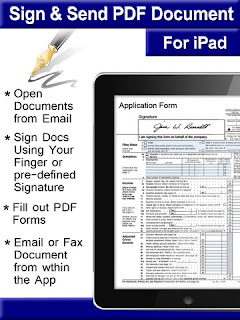
If yes then this app is for you. Using this app, you can open your documents from your email, sign it using your finger or stylus and send the signed document back to sender using either Email or Fax.
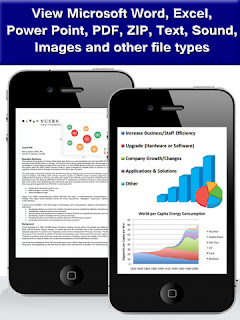
Additionally, the app allows you to READ or ANNOTATE PDF documents or CONVERT documents to PDF on your iPhone or iPad.
It allows you to mark up documents with highlights and handwriting, insert text, stamps, pictures or signature and share your documents with others through email or fax.
You can also use PDF Master for filling out PDF forms right on your iPad and iPhone.
Documents can be downloaded directly from email attachments, Dropbox, PC/Mac Computers or from other applications using “Open in".

FEATURES
HIGHLIGHT TEXT
Mark important things in books, journals or documents you want to review.
DRAW WITH YOUR FINGER
Use it to make handwritten notes or highlight text in scanned books.
INSERT PICTURES You can take pictures from your camera or import from your photo library and insert them in your PDF document.
SIGN & SEND
The easiest way to sign and send documents. With only a few clicks:
You can open documents from email attachment
Sign documents using your finger or saved signature
Send document back to sender through email or Fax from within the app
SAVE MULTIPLE BOOKMARKS
Bookmark pages in the PDF documents or books. See all your bookmarks and easily jump to any one.
REVIEW DOCUMENTS
Mark up errors and place special emphasis on important sentences.

FILL FORMS
Fill out PDF forms easily
SHARE DOCUMENTS
Send documents to others through EMAIL, FAX or upload to DROPBOX, GOOGLE DRIVE,
THUMBNAIL and EASY SCROLLING
The app includes a superior PDF viewer that shows a thumbnail view of pages and lets you scroll easily or jump to any page.
PRINT TO WIRELESS PRINTERS
Using this app, you can print PDF documents to any AirPrint capable wireless printer in your wifi network.

Content Freshness & Updates
Project Timeline
Created: (5 years ago)
Last Updated: (5 months ago)
Update Status: Updated 5.7 months ago - Older content
Version Information
Current Version: 1.0 (Initial Release)
Development Phase: Innovation Stage - Demonstrating cutting-edge capabilities
Activity Indicators
Project Views: 732 total views - Active engagement
Content Status: Draft or private - Not yet published
Content Freshness Summary
This project information was last updated on June 21, 2025 and represents the current state of the project. The content is older and may not reflect the most recent project status. The project shows active engagement with 732 total views, indicating ongoing interest and relevance.
Visual Content & Media
Project Screenshots & Interface
The following screenshots showcase the visual design and user interface of Document Sign And Send:
Screenshot 1: Main Dashboard & Primary Interface
This screenshot displays the main dashboard and primary user interface of the application, showing the overall layout, navigation elements, and core functionality. The interface demonstrates the contemporary design approach and user-centered interface design.
Screenshot 2: Key Features & Functionality
This screenshot displays key features and functionality of the application, demonstrating specific capabilities and user interactions. The interface demonstrates the contemporary design approach and user-centered interface design.
Live Demo & Interactive Experience
Live Demo URL: https://itunes.apple.com/us/app/document-sign-send/id886094133
Experience Document Sign And Send firsthand through the live demo. This interactive demonstration allows you to explore the application's features, test its functionality, and understand its user experience. The live demo showcases the mobile application's real-world performance, providing a comprehensive understanding of the project's value and potential.
Visual Content Summary
This project includes 2 screenshotsno videos plus a live demo, providing comprehensive visual documentation of the mobile application. The media content demonstrates the project's user interface design, showcasing both the visual appeal and functional capabilities of the solution.
Technical Specifications & Architecture
Technology Stack & Implementation
System Architecture & Design
Architecture Type: Mobile Application
Architecture Pattern: Mobile-First Architecture with responsive design principles
Scalability & Performance
Scalability Level: Standard - Scalable architecture ready for growth
Security & Compliance
Security Level: Standard security practices for development projects
Data Protection: Standard data protection practices for user information and application data
Integration & API Capabilities
Live Integration: https://itunes.apple.com/us/app/document-sign-send/id886094133 - Active deployment with real-world integration
Integration Readiness: Showcase-ready for demonstration and integration examples
Development Environment & Deployment
Deployment Status: Live deployment with active user base
Technical Summary
This mobile project demonstrates modern technical architecture with innovative showcase potential. The technical foundation supports demonstration and learning with modern security practices and scalable architecture.
Common Questions & Use Cases
How to Build a mobile Project Like This
Best Practices for mobile Development
General Development Best Practices
- Code Quality: Write clean, maintainable code with proper documentation
- Security: Implement authentication, authorization, and data protection
- Performance: Optimize for speed, scalability, and resource efficiency
- User Experience: Focus on intuitive design and responsive interfaces
- Testing: Implement comprehensive testing strategies
- Deployment: Use CI/CD pipelines and monitoring systems
Use Cases & Practical Applications
Target Audience & Use Cases
Learning Use Cases: Excellent for developers learning modern technologies, students studying mobile, or professionals seeking inspiration for their own projects.
Comparison & Competitive Analysis
Competitive Advantages
- Technical Excellence: Demonstrates cutting-edge implementation and best practices
Learning Resources & Next Steps
Hands-On Learning
Try It Yourself: https://itunes.apple.com/us/app/document-sign-send/id886094133
Experience the project firsthand to understand its functionality, user experience, and technical implementation. This hands-on approach provides valuable insights into real-world application development.
Project Details
Project Type: Mobile
Listing Type: Showcase
Technical Architecture
Business Context & Market Position
Innovation Showcase
This project demonstrates innovative approaches to mobile and showcases cutting-edge implementation techniques. It represents the latest in technology innovation and creative problem-solving.
Development Context & Timeline
Project Development Timeline
This project was created on March 30, 2020 and last updated on June 21, 2025. The project has been in development for approximately 69.3 months, representing 2079.4203181772 days of development time.
Technical Implementation Effort
Market Readiness & Maturity
Innovation Stage: This project represents cutting-edge development and innovative approaches. It showcases advanced technical implementation and creative problem-solving.
Competitive Analysis & Market Position
Market Differentiation
Market Opportunity Assessment
Competitive Advantages
- Technical Innovation: Cutting-edge implementation showcasing advanced capabilities
- Creative Problem-Solving: Unique approaches to common market challenges
- Technology Leadership: Demonstrates expertise in emerging technologies and methodologies
About the Creator
Developer: User ID 6719
Project Links
Live Demo: https://itunes.apple.com/us/app/document-sign-send/id886094133
Key Features
- Showcasing innovative project
Frequently Asked Questions
What is this project about?
Document Sign And Send is a mobile project that Do you often run into a situation when someone sends you a document in email and ask you to sign the document and send it back to him/her?If yes then this app is for you. Using this app, you can open....
What makes this project special?
This project is being showcased to highlight innovative ideas and technical achievements. It demonstrates creative problem-solving and technical expertise.
Can I see a live demo of this project?
Yes! You can view the live demo at https://itunes.apple.com/us/app/document-sign-send/id886094133. This will give you a better understanding of the project's functionality and user experience.
How do I contact the project owner?
You can contact the project owner through SideProjectors' messaging system. Click the "Contact" button on the project page to start a conversation about this project.
Is this project still actively maintained?
This project is being showcased, so maintenance status may vary.